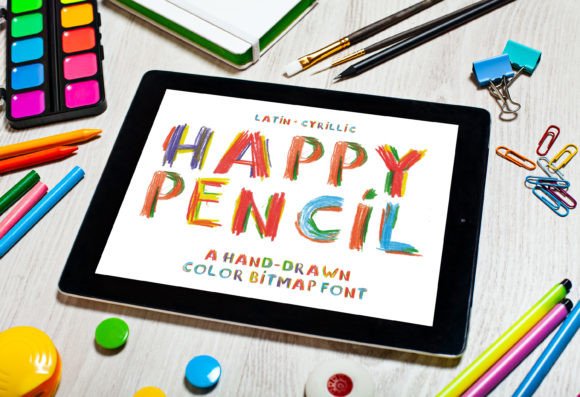
Happy Pencil: The Color Font That Brings Joy to Kid-Friendly Designs
There's something magical about a fresh box of colored pencils—the bright, saturated hues, the slightly waxy texture, the way each shade feels full of possibility. That exact feeling is what inspired the creation of Happy Pencil, a playful color font that captures the hand-drawn warmth of childhood creativity. If you've ever struggled to find a typeface that feels genuinely fun without crossing into cartoonish territory, this one deserves your attention.
Happy Pencil isn't your typical display font. It's a color font, which means each letter arrives with built-in color information—no extra steps required on your part. The strokes mimic the look of colored pencil on paper, complete with subtle texture and vibrant, multicolored fills. It's the kind of typeface that makes people smile the moment they see it, and that emotional response is incredibly valuable in design work aimed at families, children, educators, and anyone who wants to communicate warmth and approachability.
Why Color Fonts Like Happy Pencil Are Changing the Design Game
For years, designers relied on manual coloring techniques to achieve multicolored text effects. You'd set your type, then painstakingly apply gradients, textures, or layer masks to give each letter visual interest. Color fonts eliminate that workflow entirely. With Happy Pencil, the color data lives inside the font file itself, so you simply type and the vibrant, textured result appears automatically.
This matters for practical reasons beyond aesthetics. When you're building a brand identity for a children's tutoring service, a daycare center, or an educational app, consistency is everything. A color font ensures that every time someone types your headline, it looks exactly the same—same colors, same texture, same personality. That kind of visual consistency builds brand recognition faster than most people realize.
Happy Pencil works beautifully in applications that support color fonts, including recent versions of Adobe Photoshop, Illustrator, and InDesign, as well as many web browsers. It's worth checking compatibility with your specific tools before committing to a project, but the range of supported software continues to grow each year.
Where Happy Pencil Really Shines: Practical Applications
The real test of any creative font isn't how it looks on a specimen sheet—it's how it performs in actual projects. Here's where Happy Pencil tends to deliver the strongest results:
- School and educational materials: Worksheets, classroom posters, bulletin board headers, report card templates, and reading log designs all benefit from a typeface that feels approachable and age-appropriate. Happy Pencil hits that sweet spot between playful and readable.
- Children's branding: If you're designing a logo for a pediatric office, a kids' clothing line, a toy shop, or a children's book series, this font communicates the right tone immediately. It says "we're friendly, we're creative, and we take fun seriously."
- Packaging design: Standout packaging on store shelves often relies on typography that triggers an emotional response. For products aimed at young families—snack brands, craft kits, party supplies—Happy Pencil adds that handmade quality that premium packaging increasingly demands.
- Social media graphics: Instagram posts, Pinterest pins, and Facebook ads targeting parents or educators need to stop the scroll. A colorful, textured headline created with this typeface does exactly that, especially when paired with clean photography or illustration.
- Invitations and party supplies: Birthday invitations, baby shower announcements, and graduation party materials all call for typography that celebrates. The multicolored pencil effect feels festive without being overwhelming.
- Digital products and merchandise: Printable planners, kids' activity books, tote bags, stickers, and t-shirt designs can all leverage the distinctive look of a handwritten font like this one to create products people actually want to buy.
Pairing Happy Pencil with Other Typography
One of the most common questions designers ask about any display font is: "What do I pair it with?" Happy Pencil is bold and expressive, which means it works best as a headline or accent typeface rather than body copy. The key is finding companions that complement without competing.
A clean sans serif font makes an excellent partner. Think of typefaces like Montserrat, Open Sans, or Lato for your supporting text. The simplicity of a modern sans serif lets Happy Pencil's personality take center stage while keeping longer passages easy to read. This combination works particularly well for website headers paired with paragraph text, or for poster designs where you need a punchy title followed by event details.
For projects that need a slightly warmer feel, consider a soft serif font as your secondary choice. Something like Merriweather or Playfair Display can add a touch of elegance to balance the playfulness, which is useful if you're designing for a boutique children's brand that wants to feel premium rather than purely whimsical.
The font pairing process always benefits from real-world testing. Set your actual copy—don't just type "Lorem ipsum"—and view it at the size your audience will actually encounter. A headline that looks perfect at 72 points on your monitor might lose its charm at 24 points on a mobile screen. Happy Pencil's textured details tend to hold up well at medium to large sizes, but it's always smart to verify.
Readability Considerations for Kid-Focused Projects
When designing for young audiences or for the adults who read to them, readability isn't optional—it's essential. Happy Pencil's letterforms are clear and well-spaced, which gives it an advantage over many handwritten fonts that sacrifice legibility for style. Still, a few practical guidelines will help you get the best results.
Use it generously for headlines, titles, and short phrases where the font's personality can shine. Avoid setting entire paragraphs in any display or handwritten typeface, as the textured details that make it special at large sizes can become visual noise at smaller ones. Reserve body text duties for a straightforward serif or sans serif that prioritizes clarity.
Color contrast also matters more than usual with a color font. Because Happy Pencil incorporates multiple hues within each letter, you'll want to place it against backgrounds that provide enough contrast without clashing. Solid, light backgrounds—white, cream, soft pastels—tend to work best. Busy photographic backgrounds can compete with the font's inherent colorfulness, so consider adding a semi-transparent overlay or a solid text box behind your type if the background is complex.
Licensing and Commercial Use
Before using any premium font in a client project or commercial product, it's worth understanding the licensing terms. Most professional typefaces, including well-crafted options like Happy Pencil, come with specific guidelines about how many users or devices can install the font, whether it can be embedded in digital products, and what counts as acceptable commercial use. Reviewing these details upfront protects both you and your clients, and it's simply good practice for anyone who regularly works with design assets.
For small business owners and independent creators especially, investing in a properly licensed commercial font signals professionalism. It also supports the designers and foundries who create these tools, which keeps the quality of available typography high for everyone.
Happy Pencil brings a genuinely joyful energy to any project it touches. Whether you're refreshing a school newsletter, launching a children's brand, or creating social media content that needs to feel warm and inviting, it offers a distinctive visual voice that's hard to replicate with standard typefaces. The combination of built-in color, hand-drawn texture, and thoughtful letter design makes it a versatile addition to any designer's toolkit—especially when the audience is young, young at heart, or simply ready for something that feels a little more human.