Green Sweet: A Playful Color Font for Modern Design
Sometimes a project needs more than just words—it needs personality. Whether you're designing a classroom poster, crafting social media graphics, or building a brand that feels approachable and fun, typography plays a quiet but powerful role. You've probably seen fonts that feel flat or generic, and others that instantly convey a mood. The difference often comes down to choosing a typeface that aligns with the emotion you want to communicate. That's where a font like Green Sweet comes in. It's a color display font with a simple, friendly style that works surprisingly well across education, advertising, illustration, and beyond.
What Makes a Color Font Different?
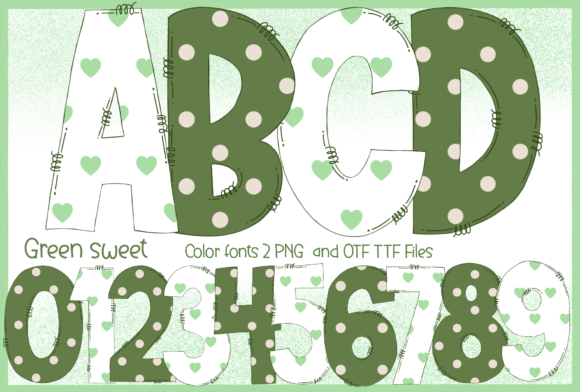
Most fonts you encounter are monochrome—they rely on a single color, usually black or white, and let the designer apply color separately. A color font, specifically an OpenType-SVG font like Green Sweet, embeds color data directly into the font file itself. This means when you type, the letters appear in multiple colors, gradients, or even textures right out of the box. It's a subtle but significant shift in how you approach design. Instead of spending time manually coloring each letter in a logo or headline, you get a ready-made palette baked into the typeface.
Green Sweet uses this technology to deliver a clean, approachable look. The colors are soft and harmonious, giving your text a cheerful quality without being overwhelming. It's the kind of font that feels at home on a child's birthday invitation, a bakery's menu board, or a wellness brand's Instagram story. The simplicity of its letterforms keeps it readable, while the color element adds visual interest that monochrome fonts can't achieve on their own.
Where This Font Shines: Real-World Applications
Think about the projects where you need typography to do more than just convey information. A teacher creating a bulletin board wants headers that grab students' attention without looking cluttered. A small business owner designing product packaging needs a font that communicates warmth and trustworthiness. A content creator making YouTube thumbnails wants text that pops against a busy background. These are the moments when a display font with built-in color becomes genuinely useful.
Here are some practical scenarios where Green Sweet fits naturally:
- Educational materials: Worksheets, flashcards, classroom posters, and presentation slides benefit from a font that feels inviting to younger audiences while remaining clear enough for instruction.
- Social media graphics: Instagram stories, Pinterest pins, and Facebook ads often need bold, eye-catching text that stands out in a scrolling feed. A color font reduces the steps needed to create that impact.
- Branding and logos: For businesses targeting families, children, or lifestyle audiences, Green Sweet can serve as a headline font that reinforces a playful, approachable brand identity.
- Packaging design: Food products, cosmetics, and handmade goods often benefit from typography that feels artisanal and friendly rather than corporate and sterile.
- Invitations and event materials: Birthday parties, baby showers, school events, and community gatherings call for fonts that set a celebratory tone.
- Digital products: Ebooks, online course materials, and downloadable planners can use a consistent, recognizable typeface to build a cohesive brand experience.
- Merchandise: T-shirts, tote bags, stickers, and mugs often feature short phrases or logos where a color display font adds instant character.
Pairing Green Sweet with Other Fonts
One of the most common questions designers have about display fonts is how to pair them with body text. A font like Green Sweet works best for headlines, titles, and short bursts of text where its personality can shine. For longer paragraphs, you'll want to pair it with a more neutral typeface—something like a clean sans serif or a classic serif font that doesn't compete for attention.
For example, if you're designing a blog header, you might use Green Sweet for the post title and pair it with a readable sans serif like Open Sans or Lato for the body copy. If you're creating a poster, Green Sweet could handle the main headline while a simple serif like Merriweather carries the supporting details. The goal is contrast without conflict. You want the two fonts to feel like they belong together, but each should serve a distinct purpose.
Testing font pairings is easier than it sounds. Most design software lets you preview text in multiple typefaces side by side. Try setting your headline in Green Sweet and your body text in a few different options. Look for a combination where the headline draws the eye but the body text remains comfortable to read at smaller sizes. If the two fonts feel like they're arguing, keep searching. When they click, you'll know.
Compatibility and Practical Considerations
Before committing to any font for a project, it's worth checking where and how you'll be using it. Green Sweet is an OpenType-SVG color font, which means it works seamlessly in applications like Adobe Photoshop, Adobe Illustrator, Silhouette Studio, and Inkscape. These programs support the color data embedded in the font file, so you'll see the intended colors immediately upon typing.
However, there's an important detail to keep in mind: the OTF and TTF files included with Green Sweet are not compatible with Cricut machines. If you're a crafter who relies on Cricut for cutting projects, this is something to plan around. You might use the font for designing graphics on your computer and then import those finished designs into Cricut Design Space as images rather than editable text. It's an extra step, but it still allows you to incorporate the font into your workflow.
For anyone new to working with color fonts, there's a helpful resource worth exploring. A comprehensive font guide can walk you through installation, troubleshooting, and best practices for getting the most out of OpenType-SVG fonts. Understanding how these files behave in different programs saves time and prevents frustration, especially if you're working on a deadline.
Building a Consistent Visual Identity
Consistency is one of the most underrated aspects of good design. When your typography matches across your website, social media, printed materials, and packaging, your audience starts to recognize your brand without even reading the words. They see the colors, the letter shapes, and the overall feel, and they know it's you.
A font like Green Sweet can anchor that consistency, especially for brands with a warm, approachable personality. Using it across your Instagram highlights, your email headers, and your product labels creates a visual thread that ties everything together. It doesn't have to be your only font—most brands use two or three typefaces—but having one distinctive, recognizable font in your toolkit makes decision-making faster and your output more cohesive.
The key is intentionality. Don't choose a font just because it looks nice in isolation. Think about what it communicates. Green Sweet's friendly curves and cheerful colors suggest approachability, creativity, and a certain lightheartedness. If that aligns with your brand values and your audience's expectations, it's a strong choice. If your brand leans more corporate or serious, you might reserve it for specific campaigns or sub-brands where a playful tone is appropriate.
Making Typography Work for You
Good typography doesn't have to be complicated. It starts with understanding what you want to say and who you're saying it to. A font is a tool, and like any tool, its value depends on how well it fits the task. Green Sweet isn't the right choice for a legal document or a financial report, but for a teacher's classroom, a baker's packaging, or a lifestyle brand's social feed, it brings a warmth and clarity that more generic fonts lack.
Take the time to experiment. Set a few headlines, mock up a social post, or design a simple logo. See how the font feels in context rather than just in a preview window. Pay attention to readability at the sizes you'll actually use. And remember that the best design choices are the ones that serve your audience, not just your personal taste. When a font helps people connect with your message faster and more enjoyably, you've found the right one.